Creator Trends
Can Claude Opus 5.5 Edit a Reel? What a Creator’s Test Does—and Doesn’t—Prove
A creator says Claude Opus 5.5 edited a raw clip, but shared no output or toolchain. Here is what the claim does and does not prove, plus a safe way to test AI-assisted Reel edits.

Claude Opus 5.5 may assist with a Reel edit when connected to suitable media tools, but a recent Reddit post does not prove the model alone edited a clip or that its output was good: the author shared no video, prompt or toolchain. Duplicate footage you own, request a timecoded cut map, approve each change, then compare the corrected export with a manual edit.
Claude Opus 5.5 can assist with a Reel workflow when it has the right tools and a clear brief; it is not, by itself, a dedicated video editor. Anthropic’s model overview lists text and image input plus tool use, while the Reddit author does not say which tool connected Claude to the clip. Treat the reported result as an anecdote, then run a small comparison on footage you own before trusting an AI rough cut.
What the October 24 creator post does—and does not—show
The author of the r/ClaudeAI post said they supplied a two-minute raw clip and asked for a short-form edit. They reported that the cuts, motion graphics and effects were better than expected. The discussion then split into practical questions: where the editing work happens, whether the result keeps a creator’s taste, and whether a high effort setting was necessary. Some commenters described their own tool-connected pipelines, including separate passes for footage analysis, b-roll tagging and review. Those are individual setups described in a discussion, not built-in Claude features or independently checked case studies.
The source gives us a dated creator experiment and a useful question. It does not provide the finished video, the exact prompt, a list of tools, the amount of human correction, or a before-and-after comparison. We therefore cannot verify its quality claim, time saved, or repeatability. Do not turn “one creator said the result looked good” into “Claude edits Reels reliably.”
Opus 5.5 is the model; the editing workflow is the system around it
Anthropic identifies Claude Opus 5.5 as a general model and publishes its model ID as claude-opus-5-5. The official model overview lists text and image inputs, text output, vision and tool use. It does not describe a native timeline editor in that model table. If a workflow changes a video file, something else must provide the editing operation: for example, a connected application, a script or an editing pipeline. The Reddit author did not identify which one, so the implementation is unknown.
That distinction matters when you try to reproduce a result. A model may help choose moments, propose an edit decision list, write a script or operate an external tool. The resulting cut depends on the toolchain, footage, instructions, permissions, timing data and review process as well as the model. Ask what the system can actually do before judging the model by a final render.
Start with one controlled, low-risk clip
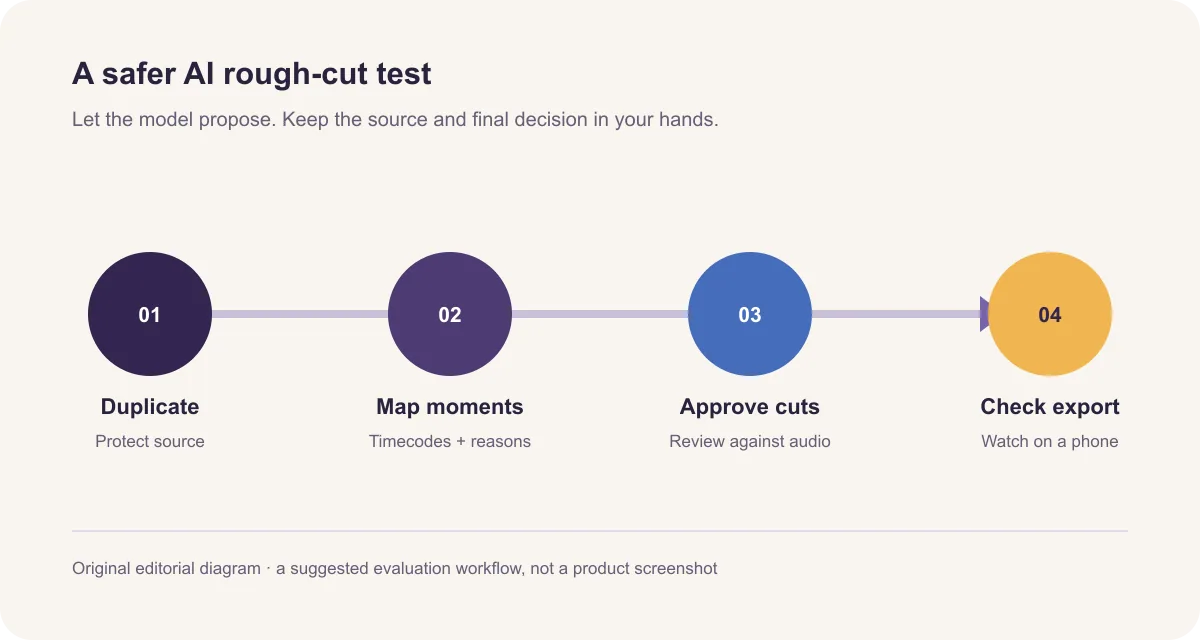
Use a short clip you own or have permission to edit. Duplicate the original file and work from the copy. Pick one clear outcome, such as “make a 25–35 second vertical explanation of why this setting matters.” Avoid asking for an entire content package at once. For the first trial, keep music, stock footage and elaborate effects out of scope; they make it harder to tell whether the edit itself improved.
Write down the non-negotiables before giving the task to an assistant: the main point, the intended viewer, any sentence that must stay intact, facts that must not be changed, and the required aspect ratio and length. If you have a transcript, include it as a reference and say that the audio remains authoritative. Tell the tool not to invent dialogue, claims, testimonials, numbers or b-roll. These constraints make review concrete.
Ask for a cut map before asking for a render
The first output should be a proposal you can inspect: source in and out timecodes, the words at each boundary, why each section stays or goes, and any uncertain decision. Ask the system to flag cuts that might remove a negation, a setup, a qualification or the answer to a question. A timecoded plan gives you a chance to correct the story before graphics and transitions make the edit feel finished.
Here is an original prompt variation for a tool-connected editing assistant. It is a suggested test prompt, not a prompt from the Reddit author, and it has not been tested here:
Original prompt variation: “Review this duplicate of my source clip for a 25–35 second vertical Reel for [audience]. The point is [one-sentence promise]. First return a timecoded cut map with the words at every cut and a short reason. Preserve the speaker’s meaning and exact wording; flag uncertain sections instead of guessing. Do not add facts, generated dialogue, music, graphics or b-roll. Do not edit or overwrite the source. Wait for my approval before applying changes. After approval, make a separate draft and list the changes made.”
Review every proposed cut against the audio. Keep the sentence that makes the explanation accurate, even if it adds a few seconds. If the editor can show a transcript beside the timeline, compare the text and the waveform at each edit. If the tool cannot explain or expose its cuts, use a smaller task—such as finding candidate moments—and make the edit yourself.
Approve the story before adding style
Once the spoken sequence makes sense, decide whether captions, a visual insert or a title actually helps the viewer understand it. Add one supporting visual at the line it explains. If an assistant suggests b-roll, ask what information the shot adds and whether you have permission to use it. Decorative footage can make an edit look busy while weakening the connection between the words and the evidence.
Review captions against the final audio, not only the transcript. Check names, numbers, product terms, negatives and sentence endings. Watch for captions hidden by platform controls and for type that becomes hard to read on a phone. Check the export’s crop, audio level and jump cuts at normal speed. A polished preview is not enough; watch the encoded file from start to finish.
Compare effort settings fairly
Anthropic’s help page says effort controls how much thinking Claude applies. More effort can mean a more thorough response, but also more time and token use. Its model overview lists medium as Opus 5.5’s default effort; the help page describes Max as the most thorough option for especially difficult work. Neither setting guarantees a better edit, supplies missing tool access, or turns an ungrounded visual choice into a correct one.
If you want to know whether effort changes your results, hold everything else constant. Use the same duplicate clip, instructions, model, connected tools and acceptance checklist. Run one pass at the default setting and one at a higher setting. Compare the cut decisions and the time spent correcting them. Do not use one unrelated video for each setting: the footage and story would confound the comparison. A single pair is only a first check, not a general benchmark.
Measure the work that remains
Track total time from preparing the source through a publish-ready export, including correction and re-rendering. Count how many proposed cuts you accept, change or reject. Log concrete errors: a changed meaning, a cut inside a word, an unsupported graphic, a mismatch between b-roll and narration, a caption mistake, or a broken export. Ask one person from the intended audience what the video explains after one watch.
Do not treat views from one post as a controlled measure of editing quality. Topic, hook, audience distribution, timing and many other factors can change reach. For a workflow test, first decide whether the edit is accurate, clear, watchable and cheaper in time to finish. If it passes, test it across several clips with different speech patterns before making it part of a routine.
Where AI rough cuts help—and where they need a director
The easiest wins to test are bounded, repeatable jobs: create a transcript, locate repeated takes, mark long pauses, draft a timecoded sequence, or suggest where a specific product shot might support a line. These tasks have visible inputs and outputs, so you can inspect the result. A creator in the discussion described learning a preferred editing style over several revisions; that is evidence of one person’s process, not a universal feature or outcome.
The harder decisions are often about intent: whether a pause feels honest, whether a reaction shot changes the tone, which detail earns the opening, or when a story needs room to breathe. AI can offer alternatives, but the creator needs to set the taste and decide whether the cut still sounds like them. If an automated pass repeatedly removes the reason a point matters, keep the tool on analysis or rough-selection duty and do the final assembly by hand.
A simple 30-minute evaluation
Choose one minute of clean footage and make a manual edit you are happy with. Save the source, the finished edit and the time it took. Then give an AI-assisted setup a copy of the same clip and the same one-sentence goal. Ask for a cut map first, review it, approve only the edits you agree with, and finish the result. Record total time, accepted edits and errors. Repeat this with a second clip before deciding whether the workflow helps.
This experiment keeps the comparison honest: the assistant sees the same material and goal, while the creator still approves the edit. If the system needs a lot of repair, that is part of its cost. If it saves time on repetitive selection but misses emotional timing, use it for selection and keep the director’s role.
Limitations
This article analyzes a public creator discussion and official Anthropic documentation; it does not reproduce the Reddit edit, test Opus 5.5 on a video, or verify a particular editing integration. The discussion’s claimed result remains unverified because no output or setup was provided. Tool availability and model settings can change, so check the current product documentation for the account and application you use.
Sources and related reading
The Claude models overview lists supported inputs and tool use. The effort settings guide explains how effort affects response depth, time and token use.